Apple Watch SE (2nd gen) is the best value entry point for HRV tracking. Don't waste it.
Same overnight HRV pipeline as pricier models. Harvee is how you make SE 2 health data actionable.
Apple Watch SE (2nd gen) updated the chip, crash detection, and watch experience while keeping the price below Series. For many buyers it’s the rational entry: notifications, fitness, sleep, and HRV in Health — without paying for ECG or titanium.
The trap is treating SE 2 as a downgrade. For HRV stress monitoring, the optical overnight signal is the same category of data Series and Ultra write to HealthKit. What SE 2 owners often skip is the interpretation layer — assuming they need to upgrade before an app can help.
Harvee is built for exactly that: read SE 2 HRV passively, learn your baseline in the first two weeks, and show whether stress is building or recovery is holding. No hardware upsell required.
SE 2: best-value HRV without the flagship price
SE 2: the entry watch that already does HRV
Apple Watch SE (2nd gen) updated the chip, added crash detection, and kept the price below Series. For health-curious buyers, it’s often the best dollars-per-sensor ratio: overnight HRV, sleep tracking, heart rate, activity — without paying for ECG or titanium you may never use.
The trap is treating SE 2 as a stepping stone. “I’ll get the real health watch later.” Later never comes, and months of HRV in Health go unread. SE 2 already writes the signal Harvee needs. The stepping stone is interpretation, not hardware.
Why SE 2 owners are ideal Harvee users
SE 2 buyers skew newer to Apple Watch health data. They want clarity, not jargon. They didn’t buy a sports lab on their wrist — they bought a watch that tracks sleep and closes rings. Harvee’s Playbook and Today tabs are built for that profile: one daily insight, education when you’re curious, depth in Patterns when you’re ready.
Passive overnight HRV fits real life better than morning measurement rituals. Parents miss mornings. Students snooze through alarms. SE 2 on your wrist while you sleep means Harvee’s trend line stays intact even when your schedule doesn’t.
SE 2 vs Series: what you actually give up
You give up ECG, always-on display tiers, and some advanced sensors on certain models. You don’t give up overnight HRV for Harvee’s purposes. Comparative studies and real-world usage both suggest trend monitoring from watch HRV works when wear is consistent — SE 2 delivers that consistency if you sleep with it on.
Building your baseline on SE 2
Week one: wear to sleep, open Harvee briefly each morning. Week two: baseline stabilises, deviations become meaningful. Week three: you can look back at a hard stretch and see when HRV started sliding — often before you named it stress.
That’s the puzzle Harvee helps solve: not what is my number today, but what has my nervous system been doing while I was busy living.
Harvee is not a medical device. Use it as body wisdom, not as a substitute for care when you need professional support.
Who this is for
This page is for you if:
- You wear your Apple Watch SE (2nd gen) daily and want the most from its health sensors
- You chose SE 2 deliberately for value and want software that respects that choice
- You want HRV and stress insight comparable to Series owners without comparable spend
- You're new to Apple Watch health data and want one app that explains it clearly
This is not for you if:
- You don't own an Apple Watch. Harvee requires Series 4 or later including SE 2.
- You need ECG or SpO2 as primary health tools. SE 2 lacks some sensors; Harvee focuses on HRV and stress trends.
The solution
How Harvee helps
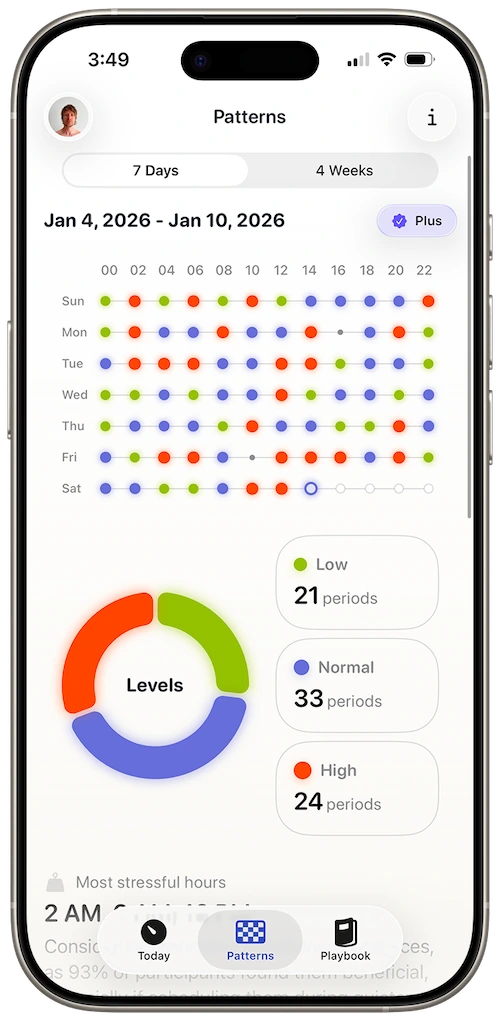
Harvee syncs with HealthKit, uses SE 2 overnight HRV, and delivers personal stress and recovery baselines — the interpretation layer SE 2 doesn't include out of the box.
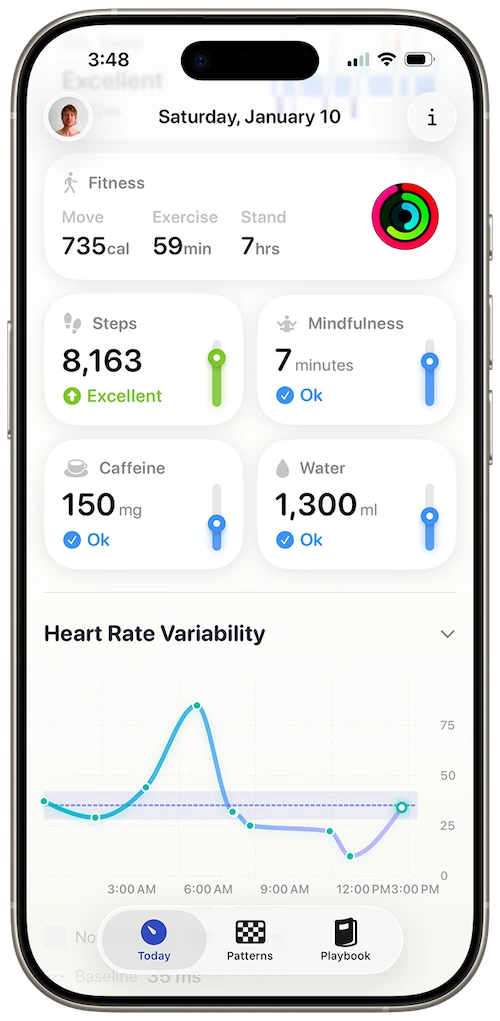
Stress view designed for one daily check-in
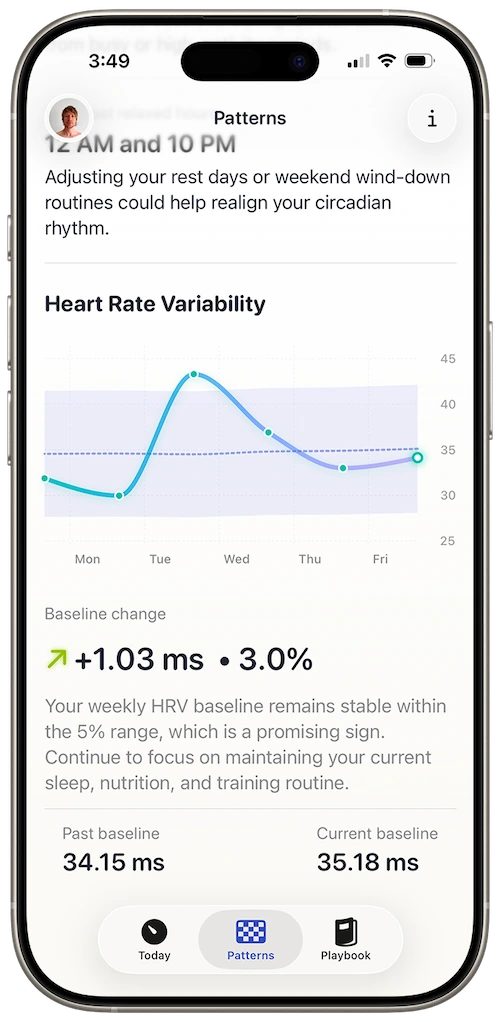
Recovery context when HRV stays below your norm
Same HRV capability, smarter use
SE 2 writes overnight HRV to Health like Series models. Harvee is how that data becomes decisions.
Best-value path to patterns
Free Today and Playbook tabs give daily utility. Harvee+ unlocks deep trends — still less than jumping to Ultra for health features alone.
Clear onboarding
Built for first-time HRV users who don't want jargon — common among SE 2 buyers.
Upgrade-optional
When Harvee shows sustained overload, you'll know if the issue is load — not missing sensors on SE 2.
You unboxed SE 2, wore it to sleep for a week, and opened Health to HRV you didn't understand. Harvee's first baseline week made the next month readable — no Series upgrade required.
Common questions
Questions people ask before downloading
What's different about SE 2 HRV vs first-gen SE?
Both record overnight optical HRV to HealthKit. SE 2's faster chip improves overall watch responsiveness; Harvee's model treats both SE generations the same for HRV baselines.
SE 2 added crash detection — does that relate to HRV?
Separate features. Crash detection uses motion and fall sensors. HRV uses the optical heart sensor during sleep. Harvee reads the latter for stress-recovery trends.
I'm a new Apple Watch owner with SE 2 — where do I start?
Wear SE 2 to sleep for two weeks, install Harvee, grant Health access. The Playbook tab explains HRV in plain language while your baseline forms.
Can SE 2 replace a dedicated HRV app with morning measurements?
If you want passive overnight trends, yes. If you need controlled morning RMSSD for sport periodisation, a dedicated athlete tool may still fit alongside Harvee.
Does SE 2 work with family setup or a child's watch?
Harvee requires HealthKit data on the iPhone paired with the watch. Family setup may limit third-party health apps — check that Health data syncs to the managing iPhone.
App Store reviews
What people said before they tried it — and after
4.7 stars on the App Store
Beautiful app
Jan 24, 2026 — dsteshinA wonderful app that helps manage stress. Harvee the fluffy one is just a cutie.
More useful than Whoop
Dec 26, 2025 — Angie_2906I already had a Whoop and wasn't sure I needed another app. But I found Harvee tracks my stress levels more accurately in daily life - and the insights are actually actionable. I don't need the Whoop anymore.
Simpler than I expected
Jan 4, 2026 — Aaleck0I'd tried other HRV apps and found them overwhelming. Harvee is different - the insights are clear, the presentation is clean, and it actually fits into daily life without becoming another thing to manage.
Try it free
Try it. You'll know within a week.
SE 2 owners often install three health apps and delete two within a week. Try Harvee alone for seven days of sleep wear. The Today tab is free and designed for first-time HRV users — one takeaway per day, not a dashboard avalanche.
If it clicks, Harvee+ adds Patterns. If not, your SE 2 keeps filling Health with HRV either way.

Why we built it
Why Harvee exists
SE 2 is the rational entry point — and Harvee is the rational interpretation layer. No upsell to Ultra, no chest strap ritual, no morning window you can’t keep. Just the watch you bought and the data it’s already collecting.
Best-value watch. Full-value insight.
Requires Apple Watch Series 4 or later. iPhone required.