Apple Watch Series 9 tracks your HRV automatically. Most people never look at it.
Double tap, brighter screen, faster chip — and overnight HRV samples piling up in Health with nowhere to go.
Apple Watch Series 9 added gestures and processing power most owners feel every day. The health pipeline underneath is steady: optical heart sensing during sleep, HRV exported to Health, resting heart rate, sleep stages. The watch does its job whether you review the results or not.
The gap is interpretation. Series 9 generates more health data than ever. Without baselines, a low HRV morning looks alarming when it might be normal for you after a hard workout — or quietly serious when it’s the tenth day of decline during a stressful quarter.
Harvee reads Series 9 data passively through HealthKit and turns weeks of samples into a readable story about stress load and recovery — the layer Apple Health doesn’t provide on its own.
What Series 9 HRV data actually tells you
How Series 9 records HRV — and why most owners miss it
Apple Watch Series 9 didn’t change the fundamental health sensor story. It made the watch faster, brighter, and easier to use one-handed with Double Tap. Underneath those headline features, the optical heart sensor still does the quiet work: sampling beat-to-beat variation during sleep and low-activity periods, writing RMSSD values into Apple Health whether you open the app or not.
That consistency is the foundation Harvee builds on. A single Series 9 HRV reading — say, 41ms on a Tuesday morning — is almost meaningless in isolation. The same reading after a hard workout is normal. The same reading on the tenth day of a stressful quarter is a warning. Context comes from your personal baseline, not from comparing yourself to population charts online.
What makes Series 9 sleep HRV reliable
Series 9 benefits from refinements Apple introduced across recent generations: faster heart rate sampling, better motion rejection during sleep, and tighter integration with sleep focus modes. When you wear Series 9 overnight, HealthKit typically receives one or more HRV samples from the sleep window — the cleanest autonomic snapshot of your day.
Harvee weights those overnight readings because they’re less contaminated by caffeine, meetings, and movement than daytime samples. Over two weeks, a baseline emerges: your normal range, your typical weekly rhythm, and the direction you’re trending. That’s when HRV stops being a curiosity and starts being a decision tool.
Series 9 vs Apple Health: the interpretation gap
Health app shows a list. It doesn’t answer whether today’s number is high or low for you, whether the last seven days form a pattern, or whether recovery is following a stress spike. Series 9 owners who open Health once a month see noise. Owners who use Harvee see shape — climbs, slides, plateaus.
The detective framing fits here: your watch gathers evidence every night. Harvee helps you read the case file.
When Series 9 data is most useful
Series 9 HRV trends shine in three situations: high-pressure work stretches where you feel fine until you don’t; training blocks where you need to know if recovery kept pace with load; and post-illness return-to-normal, when you want confirmation your nervous system is climbing back rather than guessing from energy alone.
Harvee is not a medical device and should not replace professional medical advice. It is wellness insight — pattern recognition for people who wear Series 9 daily and want their data to mean something before the crash, not after.
Who this is for
This page is for you if:
- You wear your Apple Watch Series 9 daily and want HRV to mean something beyond a number in Health
- You use Double Tap and watch features daily but haven't connected them to stress or recovery insight
- You want passive tracking — no morning measurements, no extra hardware
- You've noticed your energy crash before you could explain why from watch data alone
This is not for you if:
- You don't own an Apple Watch. Harvee requires Series 4 or later.
- You want medical-grade ECG interpretation. Harvee focuses on wellness trends, not diagnosis.
The solution
How Harvee helps
Harvee syncs with HealthKit, uses overnight HRV from your Series 9, and calibrates a personal baseline so you see pattern — not noise.
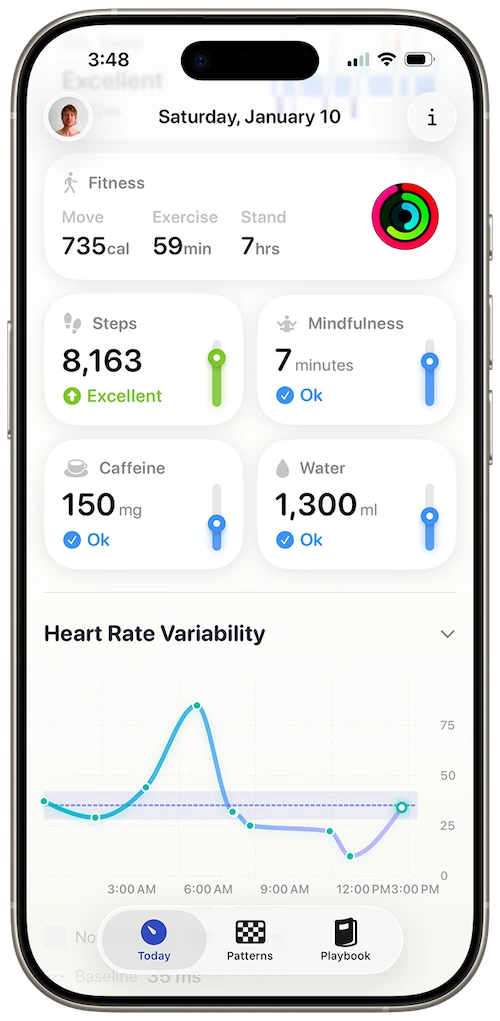
Daily stress view synthesising heart rate and sleep from your watch
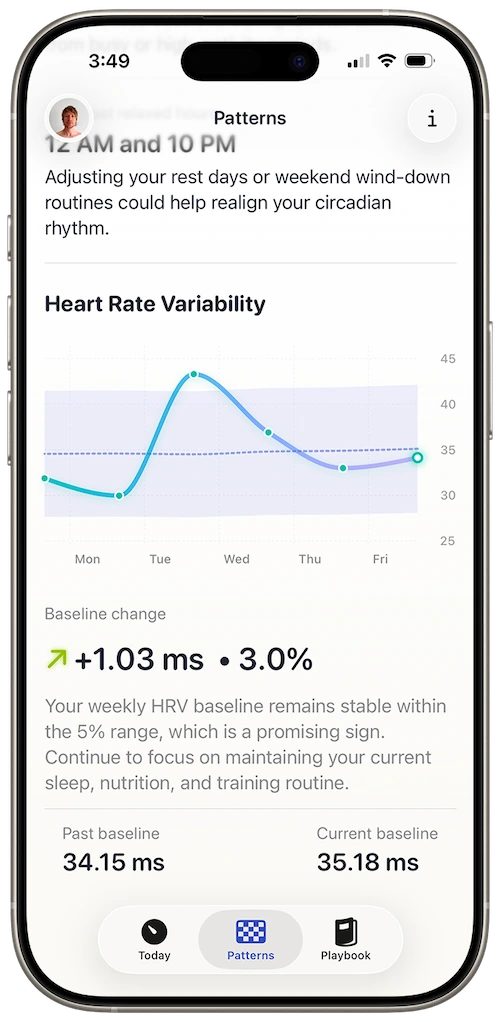
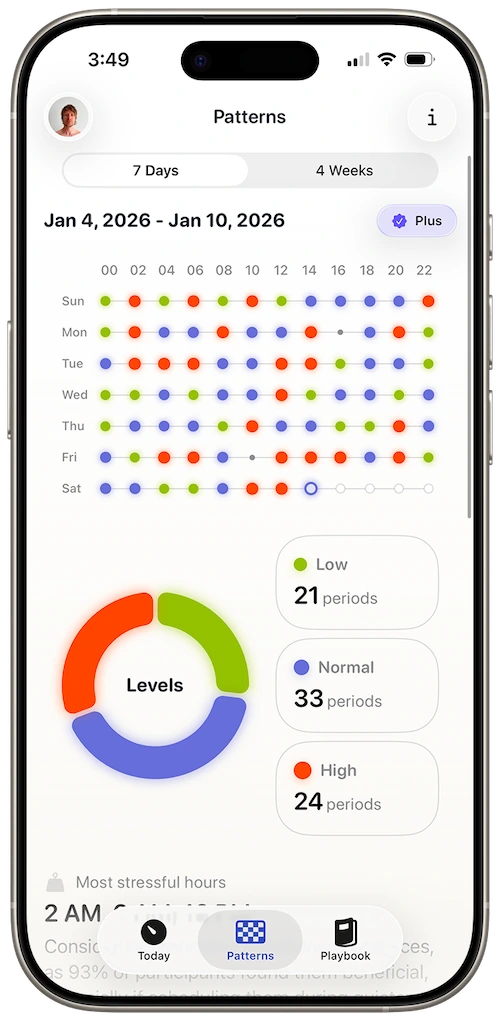
28-day pattern chart for retrospective clarity
Passive Series 9 integration
Wear your watch to sleep. Harvee handles the rest — no camera readings, no manual logs required for core trend insight.
Baseline-relative readings
A 38ms HRV reading is meaningless in isolation. Harvee shows whether that's high or low for you on Series 9 based on your history.
Stress before you feel it
Multi-day HRV slides often precede perceived burnout. Harvee surfaces the slope early enough to adjust sleep or load.
Built for Apple Health's data model
Harvee understands how Series 9 writes HRV samples and which windows are most reliable.
You double-tapped to snooze an alarm on your Series 9 and rushed into a week of meetings. Health showed HRV. Harvee showed ten days of decline starting before the busy week — your body knew first.
Common questions
Questions people ask before downloading
I use Double Tap constantly — does that affect overnight HRV on Series 9?
No. Double Tap is a daytime gesture control. Overnight HRV is captured during sleep via the optical heart sensor, independent of how you use gestures during the day.
Series 9 has a brighter always-on display — does wearing it to sleep change HRV quality?
Apple dims the display during sleep focus. Harvee weights overnight samples because they're the most stable on Series 9 — display brightness during waking hours doesn't change how sleep HRV is recorded.
I upgraded from Series 6 — will my old Health HRV history work with Harvee?
Harvee starts building your baseline from when you connect. Historical HRV in Health may inform context, but Harvee calibrates primarily from new readings on your current watch.
Does the S9 chip make HRV more accurate than older watches?
Series 9 processes heart rate faster, but HRV trend monitoring depends on consistent overnight wear more than chip generation. Harvee is calibrated for Series 4 and later, including Series 9.
Can I use Harvee if I only wear Series 9 during workouts?
Harvee needs overnight wear for reliable baselines. If you remove the watch at night, HRV gaps will weaken trend detection — Series 9's fast charging helps, but sleep wear matters most.
App Store reviews
What people said before they tried it — and after
4.7 stars on the App Store
Beautiful app
Jan 24, 2026 — dsteshinA wonderful app that helps manage stress. Harvee the fluffy one is just a cutie.
More useful than Whoop
Dec 26, 2025 — Angie_2906I already had a Whoop and wasn't sure I needed another app. But I found Harvee tracks my stress levels more accurately in daily life - and the insights are actually actionable. I don't need the Whoop anymore.
Simpler than I expected
Jan 4, 2026 — Aaleck0I'd tried other HRV apps and found them overwhelming. Harvee is different - the insights are clear, the presentation is clean, and it actually fits into daily life without becoming another thing to manage.
Try it free
Try it. You'll know within a week.
Download Harvee free and wear your Series 9 to sleep for seven nights. The Today tab shows daily stress context without Harvee+. If the readings don’t match how your body feels by day eight, delete the app — your Series 9 keeps collecting HRV in Health either way.
Patterns and long-term charts require Harvee+. Try the free tier first; upgrade only if the weekly direction is useful. Refunds go through Apple Support if you subscribe and change your mind.

Why we built it
Why Harvee exists
Series 9 owners often bought the watch for Double Tap and the screen — then discovered months of HRV samples sitting unread in Health. Harvee was built for that moment: when the hardware upgrade is done and the interpretation gap is what’s left.
Your S9 chip processes heart rate quickly, but speed without context is still just a number. Harvee learns what 38ms means for your Series 9 on your schedule — not for an average from a forum post.
Your Series 9 already knows. Harvee translates.
Requires Apple Watch Series 4 or later. iPhone required.