Your Apple Watch Series 10 is collecting HRV data every night. Here's what to do with it.
The thinnest Apple Watch yet still logs heart rate variability while you sleep. Most owners never turn that data into decisions.
Apple Watch Series 10 didn’t reinvent health sensing — it refined the package. Thinner case, brighter always-on display, faster charging. Underneath, the same optical heart sensor that records HRV during sleep and quiet periods, writing samples into Apple Health whether you open the app or not.
Series 10 owners often upgrade for the screen and wrist feel, then discover the Health app full of HRV numbers with no explanation. Is 45ms good? Why did it drop last Wednesday? Should you push hard today or back off? Raw data without baselines creates anxiety more often than clarity.
Harvee is built for that gap: it reads Series 10 data through HealthKit, learns your personal HRV range over weeks, and shows stress and recovery as trends — not isolated points on a graph you have to decode alone.
Series 10 HRV: thinner watch, same overnight signal
Series 10: refinement without reinventing HRV
Apple Watch Series 10 refined what Series watches already did well: a brighter always-on display, faster charging, a thinner profile on the wrist. The health stack underneath remained coherent — optical heart sensing during sleep, HRV exported to Health, resting heart rate tracked passively. Series 10 didn’t invent a new sensor; it made living with the watch easier, which indirectly improves data continuity when you’re less likely to take it off.
That continuity is what HRV monitoring actually needs. Missing three nights in a week breaks trend lines. Series 10’s faster charge and comfortable wear encourage keeping the watch on through sleep — and sleep is where Harvee finds its anchor readings.
Reading Series 10 HRV without the anxiety spiral
Many Series 10 owners open Health once, see HRV numbers, google “normal HRV,” and close the tab more confused than before. Population averages are misleading. A 45ms reading might be excellent for you and mediocre for someone else. Without a personal baseline, monitoring creates worry instead of insight.
Harvee spends the first two weeks learning your Series 10 normal: typical range, weekly rhythm, how your HRV responds after hard training or short sleep. After calibration, the question shifts from “is this number good?” to “is this pattern going somewhere I should act on?”
What Harvee adds beyond Apple’s apps
Apple’s direction — Vitals, sleep stages, training load — points toward longitudinal health. Harvee specialises in one thread of that story: autonomic stress and recovery through HRV baselines. For Series 10 owners who want a dedicated stress-recovery lens without juggling five Health submenus, that’s the gap Harvee fills.
Practical Series 10 habits for cleaner data
Wear the watch snugly two finger-widths above the wrist bone. Enable sleep focus so overnight samples cluster reliably. Charge before bed if needed — Series 10’s fast charge makes this less of a trade-off than older models. Then let Harvee do the interpretation work on iPhone while you sleep.
Harvee is wellness insight, not medical advice. If HRV trends concern you clinically, bring the pattern to a qualified professional — the chart is a conversation starter, not a diagnosis.
Who this is for
This page is for you if:
- You wear your Apple Watch Series 10 daily and see HRV in the Health app without knowing how to use it
- You chose Series 10 for the display and form factor and want health features to match that investment
- You want stress and recovery insight that uses overnight HRV from your current watch — no new hardware
- You've had busy stretches where you felt off before you understood your body was already signalling
This is not for you if:
- You don't own an Apple Watch. Harvee requires Apple Watch Series 4 or later with iPhone.
- You need ECG-grade clinical diagnostics. Harvee provides wellness insight, not medical diagnosis.
The solution
How Harvee helps
Harvee connects to HealthKit, pulls HRV and related signals from your Series 10, and builds a personal baseline so daily readings mean something relative to you — not a population chart.
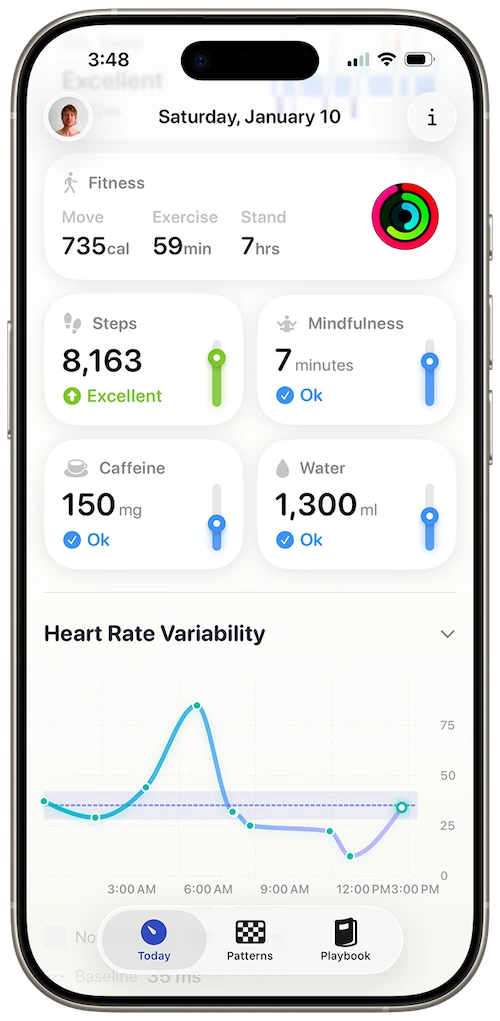
Stress load visible on the Today tab — one clear daily picture
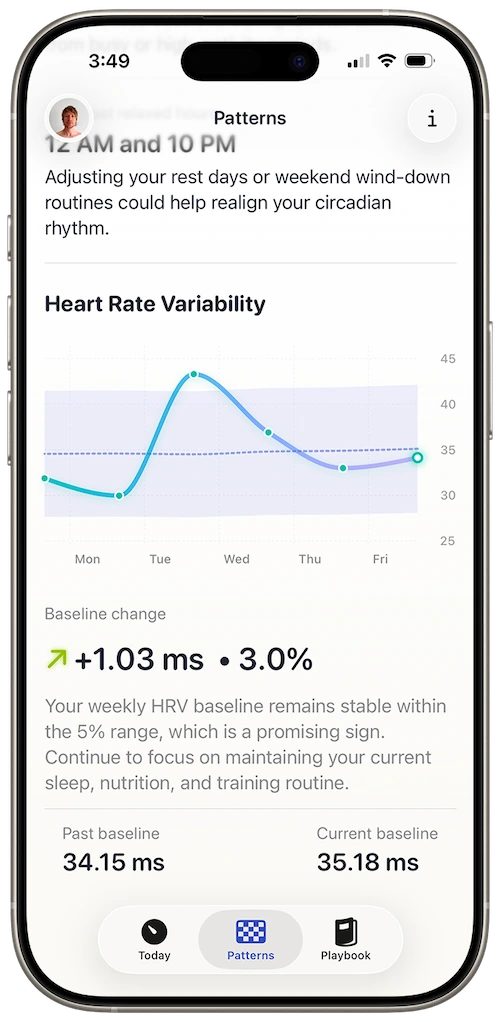
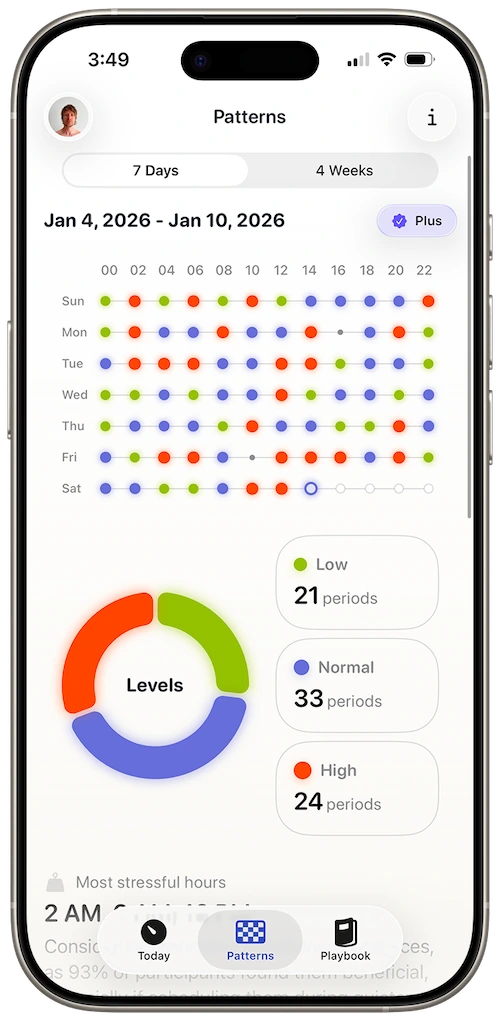
Patterns view comparing this week to your four-week baseline
Optimised for Apple Watch sleep HRV
Series 10 samples HRV most reliably overnight. Harvee weights those readings and shows direction over time — the signal that predicts burnout better than a single morning number.
Always-on friendly daily checks
Glance at stress context on iPhone without hunting through Health. Built for the same quick interactions Series 10 encourages on the wrist.
Personal baseline calibration
Your normal HRV on Series 10 may differ from averages online. Harvee learns your range in the first two weeks, then flags meaningful deviations.
No extra sensors
Uses the optical heart sensor Apple already built into Series 10. No strap, no camera measurement, no second device.
You upgraded to Series 10, synced Health, and saw HRV appear within a week. You had no idea whether the dip after your first busy month on the new job was noise or a warning. Harvee showed it was the start of a twelve-day slide — before you felt exhausted.
Common questions
Questions people ask before downloading
Series 10 is thinner — does that change how HRV is measured?
No. Sensor placement and optical heart rate technology are consistent with recent Series models. Thinner case affects wrist feel, not the HRV pipeline Harvee reads from HealthKit.
Series 10 charges faster — should I take it off less at night?
Faster charging reduces the temptation to skip overnight wear. Harvee benefits most when Series 10 stays on your wrist through sleep — that's when the cleanest HRV samples arrive.
I upgraded from Series 7 — will Harvee need to recalibrate?
Harvee builds a fresh personal baseline from your current wear pattern. A new watch is a good time to reconnect and let the first two weeks establish your new normal.
Does the larger Series 10 screen mean more battery drain for HRV?
Harvee doesn't run additional sensing on the watch. It reads HRV Apple Health already stores. Series 10 battery behaviour is unchanged by installing Harvee on iPhone.
Is Series 10 HRV better than Ultra for stress tracking?
Both write to the same HealthKit model. Ultra's advantage is often battery continuity, not sensor class. Harvee works on Series 10 and Ultra with the same baseline logic.
App Store reviews
What people said before they tried it — and after
4.7 stars on the App Store
Beautiful app
Jan 24, 2026 — dsteshinA wonderful app that helps manage stress. Harvee the fluffy one is just a cutie.
More useful than Whoop
Dec 26, 2025 — Angie_2906I already had a Whoop and wasn't sure I needed another app. But I found Harvee tracks my stress levels more accurately in daily life - and the insights are actually actionable. I don't need the Whoop anymore.
Simpler than I expected
Jan 4, 2026 — Aaleck0I'd tried other HRV apps and found them overwhelming. Harvee is different - the insights are clear, the presentation is clean, and it actually fits into daily life without becoming another thing to manage.
Try it free
Try it. You'll know within a week.
Install Harvee, grant HealthKit access, and wear Series 10 to sleep for a week. The free Today tab tells you whether passive HRV interpretation fits your life before you consider Harvee+ for Patterns.
Your Series 10 keeps logging to Health if Harvee isn’t for you. No hardware commitment beyond the watch you already own.

Why we built it
Why Harvee exists
Series 10 buyers often optimise for form — the thinnest case, the brightest screen. Harvee optimises for what that form factor still collects every night: HRV samples waiting for a baseline.
You paid for the display upgrade. The health upgrade is learning what your Series 10 has been recording in the background since day one.
Series 10 is already collecting the data. Harvee helps you read it.
Requires Apple Watch Series 4 or later. iPhone required.