StressWatch shows stress in the moment. Harvee shows what's been building.
A real-time stress reading tells you how you feel right now. It doesn't tell you your body was heading here for twelve days.
StressWatch on Apple Watch does something immediate: it estimates stress from heart rate signals and surfaces it on your wrist, often within the hour. When your chest tightens during a meeting, the complication confirms it. That feedback loop is useful.
What it doesn’t always answer is whether today’s spike is isolated or part of a longer slide. Chronic overload rarely announces itself as one bad afternoon. It accumulates — slightly worse sleep, slightly lower HRV, slightly higher resting heart rate — until a normal Tuesday feels impossibly heavy.
Apple Watch stores the history that explains the difference between a moment and a pattern. The question is whether your app reads backward as well as it reads right now.
Real-time wrist stress vs multi-week HRV patterns
StressWatch vs Harvee: now vs before now
StressWatch excels at immediacy. Complication on the wrist, stress estimate during the afternoon slump, confirmation that your chest tightness has a physiological signature. That loop helps in the moment.
Moments don’t explain months. Chronic overload accumulates as slightly worse sleep, slightly lower HRV, slightly higher resting heart rate — until a normal Tuesday breaks you. StressWatch may have flagged each afternoon; Harvee connects the afternoons into an arc.
Complementary time horizons
Many users keep both: StressWatch for live awareness, Harvee for weekly direction. They read similar Apple Watch inputs with different emphasis. No HealthKit conflict.
When to lean Harvee
Lean Harvee if you get alerts but can’t explain why some weeks flatten you, or if you want overnight HRV as the daily anchor rather than intraday variability alone.
When to keep StressWatch
Keep StressWatch if the complication is non-negotiable and daily spikes drive your coping strategies. Harvee won’t replace minute-by-minute wrist feedback.
Harvee is wellness insight, not therapy or medical care.
Who this is for
This page is for you if:
- You wear your Apple Watch daily and have used StressWatch or similar real-time stress complications
- You've been using StressWatch and want to understand whether trend-based insight adds something your current setup misses
- You get stress alerts but struggle to connect them to sleep, workload, or recovery over the past two weeks
- You've felt fine on Monday and wrecked by Thursday without understanding what changed in between
This is not for you if:
- You don't own an Apple Watch. Harvee depends entirely on Apple Watch and HealthKit data.
- You want a live stress complication as your primary interface. StressWatch is purpose-built for moment-to-moment wrist feedback.
The solution
How Harvee helps
Harvee combines Apple Watch HRV, heart rate, and sleep signals into rolling baselines and multi-week trends — so you see when stress has been climbing before the moment you're in.
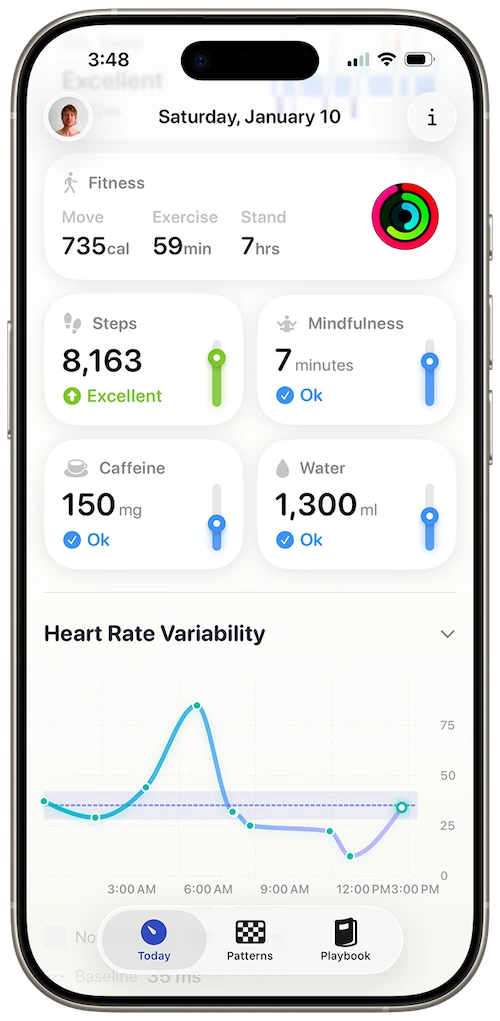
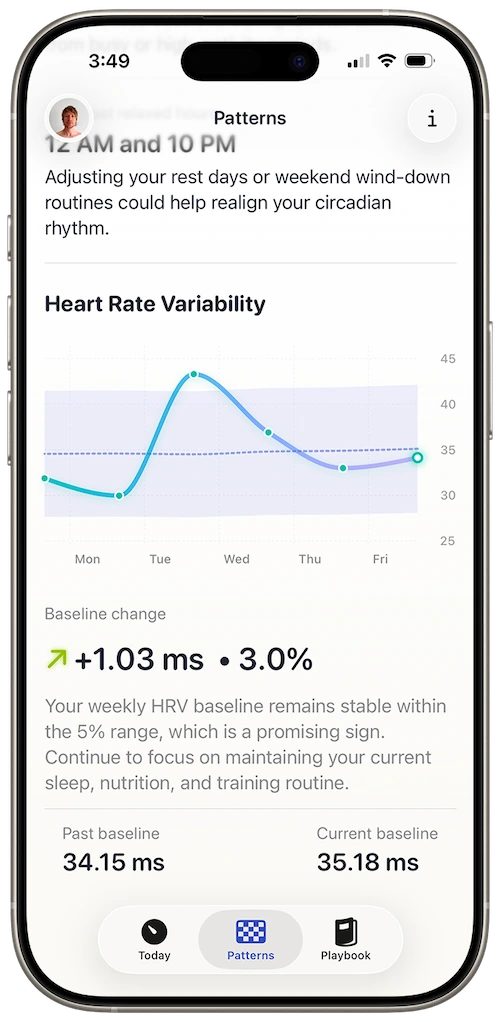
Baseline deviation showing gradual load, not only spikes
Recovery guidance tied to your personal pattern, not a generic threshold
Trend analysis, not only real-time readings
A high stress reading at 3pm is information. Nine days of declining HRV preceding it is a warning. Harvee weights the longer arc so you can act before the spike becomes a crash.
Overnight HRV as the anchor
StressWatch leans on intraday heart rate variability. Harvee treats overnight HRV as a stable daily anchor and layers daytime signals — a model tuned to how Apple Watch actually samples.
Personal baseline over population norms
What's stressful for you may not match a default threshold. Harvee learns your normal range across weeks, so alerts reflect your physiology, not an average user.
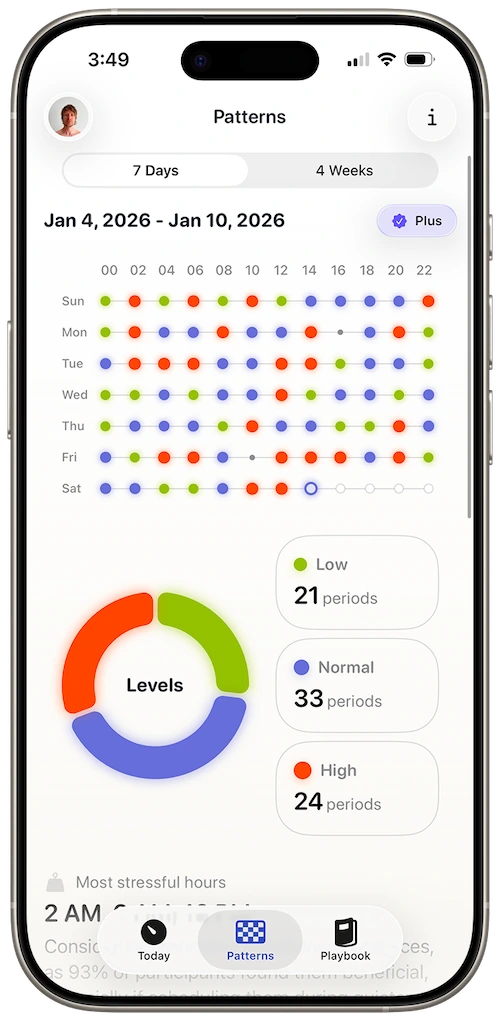
Patterns tab for retrospective clarity
Look back at a hard month and see when load started — useful for conversations with yourself, a coach, or a clinician about what was happening in your body.
StressWatch said you were elevated during the presentation. You already knew. What you didn't know — until Harvee showed the chart — was that your HRV had been sliding since the Sunday before the quarterly review cycle started. The meeting wasn't the cause. It was the peak.
Common questions
Questions people ask before switching
I've been using StressWatch for a while. Is it worth switching?
StressWatch is strong for in-the-moment awareness on the wrist. Harvee complements a different need: seeing accumulation over time. Some people replace; others use Harvee when they want the longer story. If real-time complications are non-negotiable, keep StressWatch for that and evaluate whether trend insight is missing from your setup.
Can I use both?
Yes. They read similar Apple Watch data but emphasise different time horizons. No conflict at the HealthKit level.
Is Harvee slower to tell me I'm stressed?
Harvee prioritises daily and weekly pattern clarity over minute-by-minute stress scores. If you need immediate wrist feedback during acute moments, StressWatch's model is faster for that specific signal.
How is this different from Apple Health?
Health stores HRV and heart rate without interpretation or baseline context. Harvee connects samples into a narrative about load and recovery relative to you.
Will this drain my Apple Watch battery?
Harvee consumes data Apple Watch already records. It does not run an additional continuous stress estimation on the watch beyond what you already use.
App Store reviews
What people said before they tried it — and after
4.7 stars on the App Store
Beautiful app
Jan 24, 2026 — dsteshinA wonderful app that helps manage stress. Harvee the fluffy one is just a cutie.
More useful than Whoop
Dec 26, 2025 — Angie_2906I already had a Whoop and wasn't sure I needed another app. But I found Harvee tracks my stress levels more accurately in daily life - and the insights are actually actionable. I don't need the Whoop anymore.
Simpler than I expected
Jan 4, 2026 — Aaleck0I'd tried other HRV apps and found them overwhelming. Harvee is different - the insights are clear, the presentation is clean, and it actually fits into daily life without becoming another thing to manage.
Try it free
Try it. You'll know within a week.
Keep StressWatch on your wrist if moment-to-moment feedback helps you breathe during meetings. Add Harvee for two weeks on iPhone and check whether the 28-day view explains weeks StressWatch only showed as isolated spikes. Harvee Today is free.
Drop Harvee if the long view doesn’t change decisions. No conflict at HealthKit level.

Why we built it
Why Harvee exists
StressWatch excels at now. Harvee excels at before now — the runway of physiological load that explains why now feels the way it does.
Both assume Apple Watch. Harvee is built for people who need the archive, not only the alert.
Apple recognised Harvee as a Design Awards Finalist for Social Impact. Not for how it looks. For what it does to people’s lives.
| Harvee | StressWatch | |
|---|---|---|
| Measurement method | Overnight HRV + trend baselines | Real-time heart rate variability on wrist |
| Data continuity | Multi-week pattern emphasis | Moment-to-moment stress emphasis |
| Apple Watch integration | Deep HealthKit trend analysis | Complication-first real-time display |
See the stress building — not only the stress arriving.
Requires Apple Watch Series 4 or later. iPhone required.