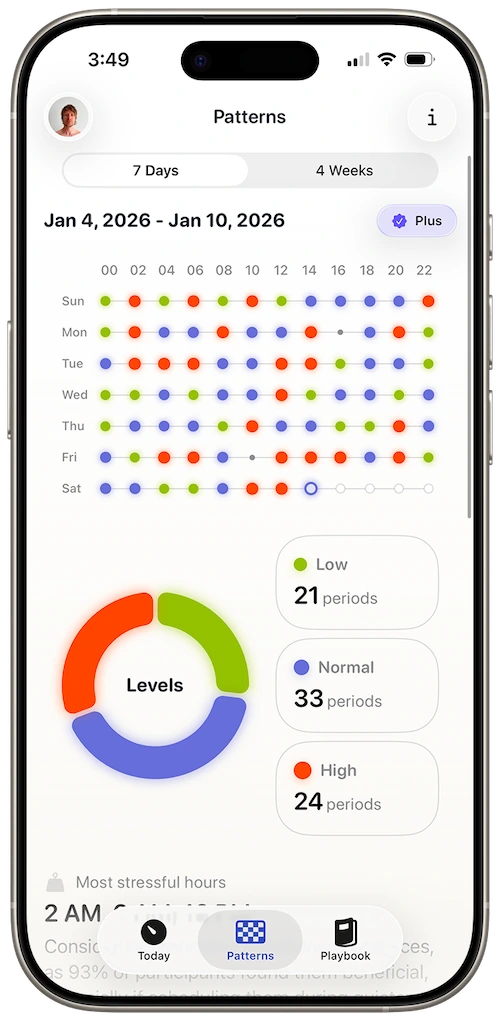
watchOS 11 changed how Apple Watch collects health data. Harvee was updated to match.
New training load, Vitals, and sleep APIs mean richer HealthKit data — if your app knows how to read it.
watchOS 11 brought Training Load, refined sleep metrics, and Vitals summaries that surface overnight heart rate and HRV deviations. Apple is pushing the watch toward longitudinal health — not single readings but whether this week looks different from your recent baseline.
That’s the right direction. It’s also easy to drown in new tiles without a narrative. Vitals might flag an HRV dip. Training Load might spike. Sleep might shorten. Three signals, three screens, no single answer to whether you should push today or protect recovery.
Harvee was built on the same philosophy Apple is moving toward: personal baselines, patterns over snapshots, stress and recovery as a loop. watchOS 11’s HealthKit updates feed that model — and Harvee’s releases align with how Apple Watch now samples and surfaces HRV across sleep and training contexts.
watchOS 11, Vitals, and reading HRV longitudinally
watchOS 11: more health tiles, same interpretation gap
watchOS 11 pushed Apple Watch health toward patterns — Training Load summarising physical exertion, Vitals surfacing when overnight heart rate or HRV deviates from your recent norm, sleep metrics refined. Apple is saying what Harvee was built on: single readings matter less than whether this week looks different from your baseline.
More tiles can mean more confusion. Vitals flags an HRV dip. Training Load spikes. Sleep shortens. Three signals, three screens, no single narrative about whether to push today or protect recovery. That’s the gap a dedicated stress-recovery app still fills.
How Harvee aligns with watchOS 11’s direction
Harvee reads HealthKit samples the way watchOS 11 writes them — including overnight HRV windows Harvee weights most heavily. When Apple adjusts aggregation or adds Vitals summaries, Harvee’s pattern-first architecture absorbs new inputs without throwing away your personal history.
Think of Vitals as a smoke alarm: something changed recently. Harvee as the investigation: how many days, how deep, is recovery following or not?
Training Load plus autonomic load
Physical training is one stressor. Work, parenting, poor sleep, and illness stack on top. Training Load captures the exercise slice. HRV reflects the total autonomic bill. watchOS 11 gives you better exercise accounting; Harvee helps you see whether your nervous system is paying it off.
For people who upgraded iPhone and watch together, the first two weeks after update are recalibration — for Apple software and for your baseline. Wear consistently, let Harvee relearn your normal, then trends restabilise.
Staying current without anxiety
Keep Harvee updated from the App Store when watchOS major releases ship. Grant Health permissions after updates if iOS prompts. Don’t chase every nightly fluctuation — watch the weekly direction.
Harvee is wellness insight, not medical advice. Vitals anomalies worth clinical attention should go to qualified professionals, with Harvee’s chart as context if helpful.
Who this is for
This page is for you if:
- You wear your Apple Watch on watchOS 11 and want apps that use the latest HealthKit data model
- You noticed new Vitals or Training Load features and want stress insight that connects them
- You upgraded iOS and watchOS together and want HRV interpretation that still works cleanly
- You want one place that reads watchOS 11 health data the way Apple intended — longitudinally
This is not for you if:
- You don't own an Apple Watch on watchOS 11 (or compatible). Harvee requires Apple Watch Series 4 or later.
- You only want Apple's stock Vitals UI with no third-party interpretation. Harvee adds a dedicated stress-recovery layer.
The solution
How Harvee helps
Harvee reads watchOS 11 HRV, sleep, and related HealthKit samples, weights them against your personal baselines, and shows stress-recovery trends designed for Apple's latest watch software.
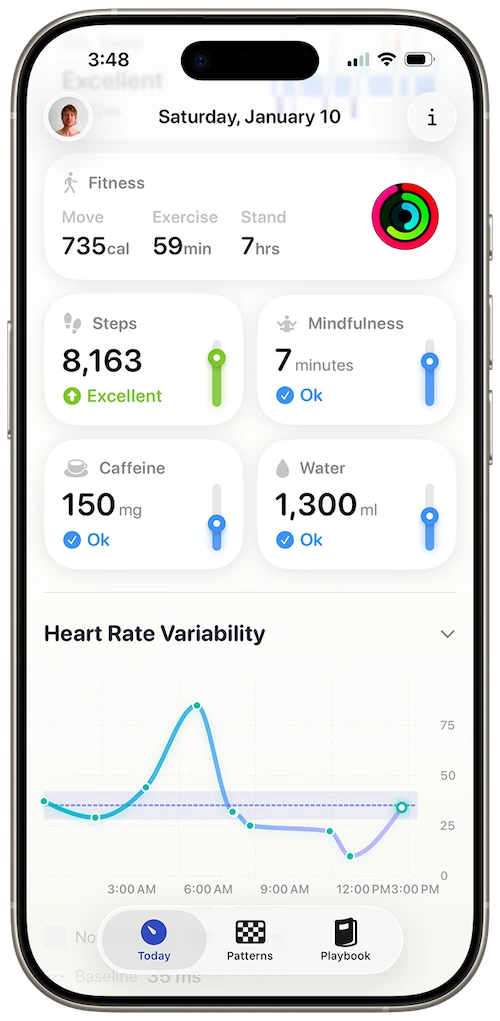
Stress trends that complement Vitals — deeper than a single flag
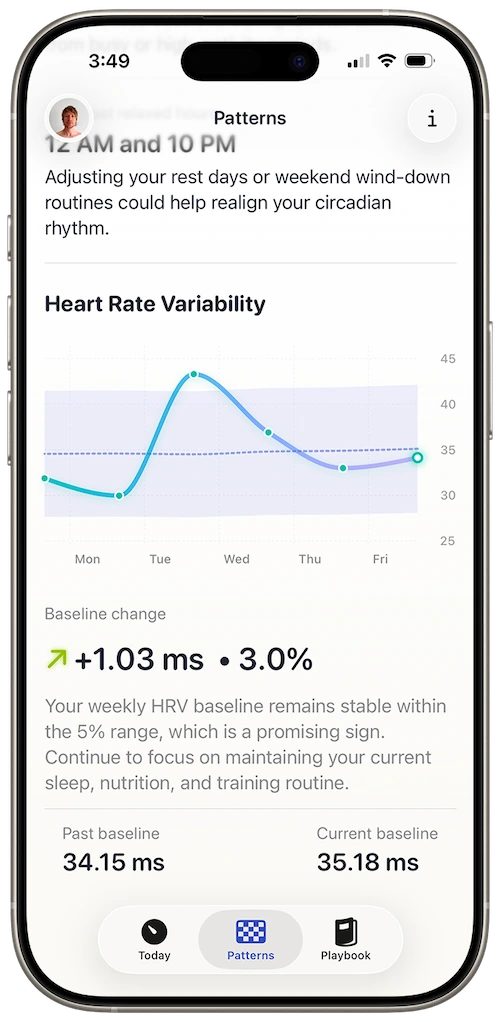
28-day Patterns view for training and life load together
watchOS 11 HealthKit aware
Harvee is maintained for current Apple Watch software — including how watchOS 11 writes and aggregates HRV relative to sleep and activity.
Beyond a single Vitals alert
Vitals tells you something changed. Harvee shows the arc — how many days, how deep, and whether recovery is following.
Training load plus nervous system
Physical load from watchOS 11 and autonomic load from HRV belong in one story. Harvee focuses on whether your body is absorbing both.
Future-ready baseline model
As Apple adds health features, Harvee's pattern-first architecture absorbs new inputs without resetting your personal history.
watchOS 11 flagged a Vitals anomaly. You opened Harvee and saw fourteen days of context — the Vitals dot was the headline; the chart was the story.
Common questions
Questions people ask before downloading
Do I need watchOS 11 specifically for Harvee?
No. Harvee supports Apple Watch Series 4 and later across watchOS versions. watchOS 11 adds Vitals and Training Load that complement Harvee's baseline model.
Apple Vitals already flags HRV changes — why use Harvee?
Vitals highlights recent deviations from your short-term baseline. Harvee adds dedicated stress-recovery trends, historical Patterns, and guidance tuned to multi-week arcs.
I updated watchOS 11 and my HRV looks different — is Harvee broken?
OS updates can change sampling or display. Keep Harvee updated from the App Store. Baselines recalibrate over days as new samples arrive.
Does Training Load replace Harvee's stress view?
No. Training Load measures physical exertion. Harvee reads autonomic recovery via HRV. Both matter; they answer different questions.
Will watchOS 11 break Harvee on older watches?
Harvee is maintained for current HealthKit behaviour. Series 4+ on supported watchOS versions continue to work; keep both watch and app updated for best results.
App Store reviews
What people said before they tried it — and after
4.7 stars on the App Store
Beautiful app
Jan 24, 2026 — dsteshinA wonderful app that helps manage stress. Harvee the fluffy one is just a cutie.
More useful than Whoop
Dec 26, 2025 — Angie_2906I already had a Whoop and wasn't sure I needed another app. But I found Harvee tracks my stress levels more accurately in daily life - and the insights are actually actionable. I don't need the Whoop anymore.
Simpler than I expected
Jan 4, 2026 — Aaleck0I'd tried other HRV apps and found them overwhelming. Harvee is different - the insights are clear, the presentation is clean, and it actually fits into daily life without becoming another thing to manage.
Try it free
Try it. You'll know within a week.
Updated to watchOS 11? Give Harvee seven nights after the update before judging baselines — your nervous system and the software both need a settling period. The free Today tab is enough to see whether the interpretation layer adds clarity beyond Vitals tiles.
If not, Vitals remains. Harvee doesn’t lock your data.

Why we built it
Why Harvee exists
watchOS 11 is Apple’s bet on longitudinal health. Harvee was already there — personal baselines, patterns over snapshots, stress as a story across weeks. Vitals is the headline; Harvee is the chapter.
watchOS 11 collects more. Harvee connects it.
Requires Apple Watch Series 4 or later. iPhone required.